Turn live discussion
into visible alignment.
PulseRoom helps teams capture live signals, see alignment clearly, and leave with a decision record they can reuse.
Live signals
Every participant's input captured in real time
Visible alignment
See where the room agrees — and where it doesn't
Decision artifact
Walk out with a clear, shareable record of the outcome
Proof of use

- Decision artifact included
- Secured by Firebase
- First signal in under 3 min
- Works in any browser — no app
- No account for participants
- Live results shown by group, not by name
Why PulseRoom
Built for high-stakes rooms where clarity and follow-through matter.
Decisions get re-litigated
People leave the room with different interpretations, and the same debate restarts in Slack or email.
A few voices dominate
In high-stakes rooms, quieter signals often matter most—but they're the easiest to miss.
No durable artifact
A long doc or slide deck isn't the same as a clear decision record with rationale and ownership.
Without structure
- "We'll circle back." (and you never do)
- Six people talking, two dominating
- Summary buried in a long deck
With PulseRoom
- Decision locked in the room (with rationale)
- Every voice counted through structured signals
- One clean artifact people actually reference
PulseRoom is for
- Workshops where outcomes matter (roadmap, budget, hiring, strategy)
- Facilitators who want rigor without heavy process
- Exec education programs that need reflection + evidence
Not ideal for
- Anonymous mass polling at 500+ scale
- Recurring meetings with no decision authority
- Icebreakers without follow-through
Meetings create motion. Decisions require alignment.
PulseRoom is built for rooms where stakes are real and outcomes must hold up after the session.
Decisions get re-litigated
People leave the room with different interpretations, and the same debate restarts in Slack or email.
A few voices dominate
In high-stakes rooms, quieter signals often matter most—but they are the easiest to miss.
No durable artifact
A long doc or slide deck is not the same as a clear decision record with rationale and ownership.
Before PulseRoom
- "We'll circle back." (and you never do)
- Six people talking, two dominating
- Summary buried in a long deck
After PulseRoom
- Decision locked in the room (with rationale)
- Every voice counted through structured signals
- One clean artifact people actually reference
PulseRoom is for
- Workshops where outcomes matter (roadmap, budget, hiring, strategy)
- Facilitators who want rigor without heavy process
- Exec education programs that need reflection + evidence
Not ideal for
- Anonymous mass polling at 500+ scale
- Recurring meetings with no decision authority
- Icebreakers without follow-through
What Sticks
What remains clear after the room ends.
Fewer decision replays
Make trade-offs explicit so you don't re-litigate the same issue next week.
Before
"Let's revisit this."
After
Decision + rationale is visible.
Clear ownership
Move from vague agreement to named next steps that survive outside the room.
Before
"Someone should..."
After
Owner + deadline + next action.
A usable artifact
Leave with a structured snapshot people actually reference—not a long doc nobody reads.
Before
Notes scattered across tools.
After
One clean, shareable summary.
Executive note: PulseRoom fits rooms where the output needs to be defendable later: strategy sessions, executive education, facilitated workshops, and scoped pilots.
Simple Pricing
Start free, then scale when usage gets more serious.
Free
Try PulseRoom
Includes
- Live sessions per month (2)
- Participants per session (6)
- Session duration (15 mins)
- Agenda items (1)
- Dimensions per agenda (3)
- Groups (1)
Basic
For individuals running real sessions, small workshops, panels, or decision discussions.
Includes
- Live sessions per month (30)
- Participants per session (300)
- Session duration (60 min)
- Agenda items (5)
- Dimensions per agenda (5)
- Group mode (Included (max:3))
- Groups per session (10)
- Analytics reports (Included (max: 10))
- Export reports (Included)
- AI wizard (Included)
- AI reports (Included)
- AI analytics (Included)
- Decision reports (Included)
Pro
For serious recurring use: workshops, strategy sessions, executive education, research groups, leadership discussions, and team decision rooms.
Includes
- Live sessions per month (50)
- Participants per session (150)
- Session duration (90 min)
- Agenda items (15)
- Dimensions per agenda (8)
- Group mode (Included (max 9))
- Groups per session (10)
- Analytics reports (Included)
- Export reports (Included)
- AI wizard (Included)
- AI reports (Included)
- AI analytics (Included)
- Decision reports (Included)
Already have an account?
Log in to the PulseRoom app and continue from your host workspace.
Real Rooms
Academic and executive settings where PulseRoom brings clarity into the discussion.
Academic
Learning environments
Teaching in class
Faculty teach one agenda item at a time while students adjust a live multi-dimensional signal on their phones, making understanding visible before the class moves on.
Experiential learning
Students use PulseRoom in groups before class, work through agenda items inside a shared dimensional frame, and arrive ready for a stronger, more disciplined discussion.
Panel discussion
Panels become more relevant when the moderator and speakers can see where the audience is following, questioning, or losing connection during the session.
Research meeting
Research groups use PulseRoom to structure proposals, findings, interpretations, and next steps so meetings become more productive, focused, and cumulative.
Executive
Decision environments
Meetings
PulseRoom works in both compact decision rooms and larger gatherings by making alignment, reservations, and confidence visible while the meeting is still live.
Brainstorming
PulseRoom helps brainstorming stay creative without becoming vague by giving the room live structure around the quality and direction of emerging ideas.
Making policies and strategies
PulseRoom helps leadership teams shape policies and strategies through visible trade-offs, making alignment stronger before the decision gets formalized.
Budget and hiring decisions
PulseRoom helps high-stakes allocation decisions reveal their real logic by making trade-offs visible while the room is still discussing them.
A 30-second walkthrough
Show the flow: setup → live signals → alignment → decision artifact.
What you'll see
- 01Host sets the decision context
- 02Participants input signals (lightweight)
- 03Alignment becomes visible instantly
- 04Export a clean decision summary
After-session analytics.
PulseRoom does not end when the room ends. Compare agendas, compare sessions, and carry the signal forward into review, refinement, and follow-through.
After the meeting
Agenda comparison
See how different agenda items performed across the same session. Identify which topics created clarity, hesitation, divergence, or stronger consensus.
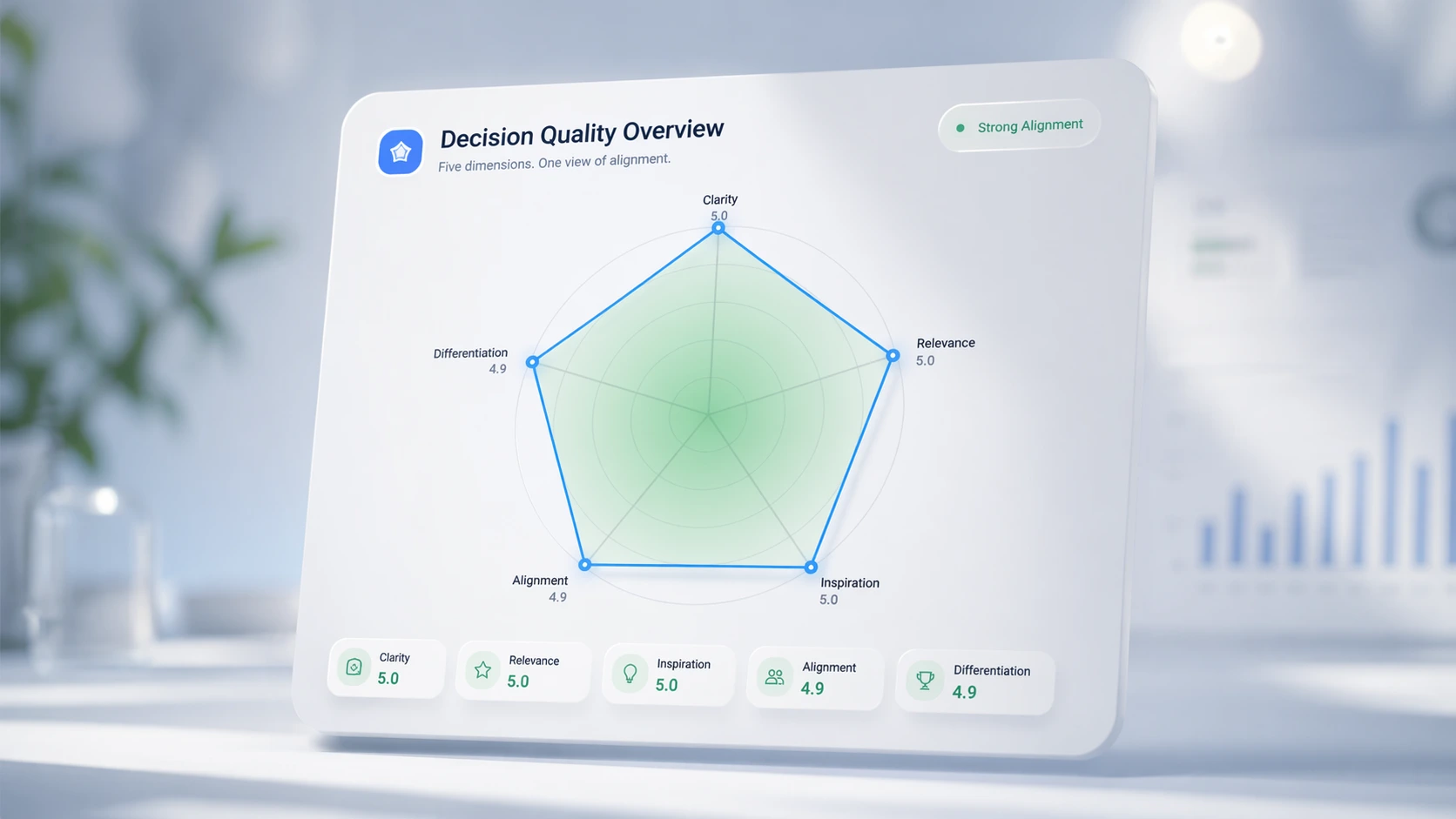
Compare one agenda against another
Spot stronger and weaker dimensions
See where discussion quality shifted
After the meeting
Session comparison
Track how outcomes change across sessions, cohorts, or repeated teaching runs. Useful for teaching improvement, leadership reviews, and facilitation quality.
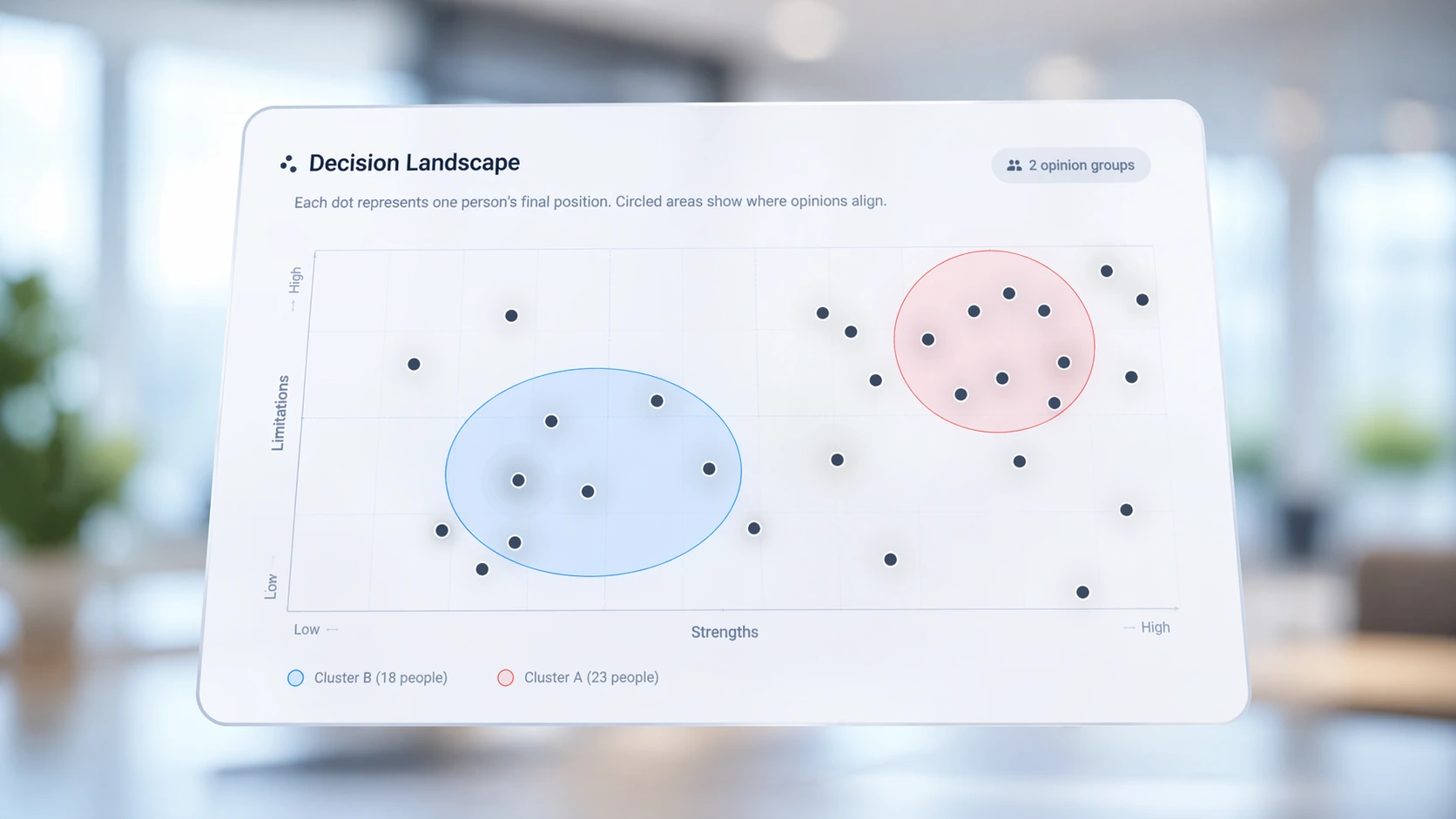
Compare one session to another
Review trends across repeated runs
See whether alignment improves over time
After the meeting
Action follow-through
Convert the room’s output into a more structured record of priorities, next steps, and follow-up actions after the discussion ends.
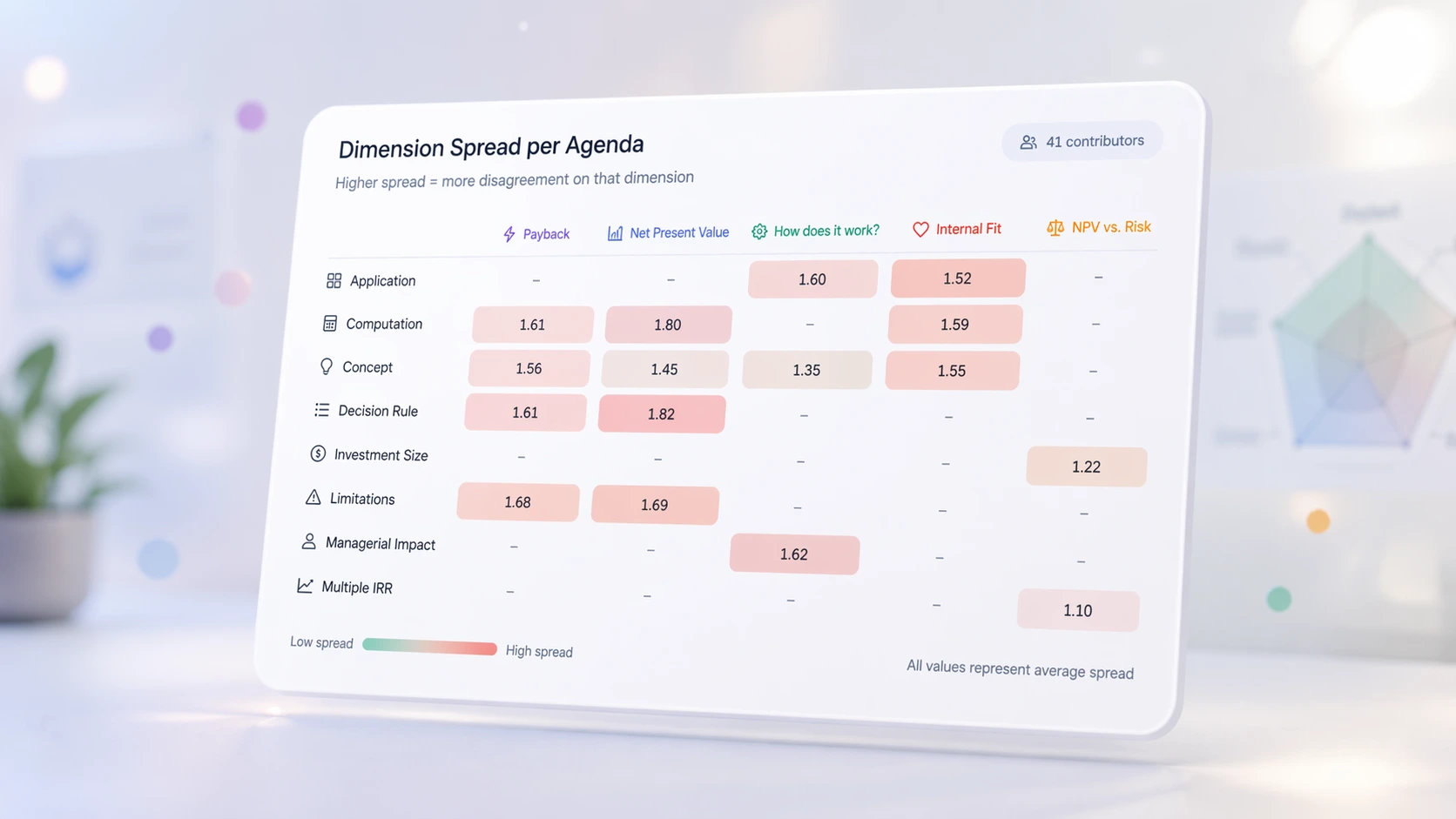
Turn output into next-step visibility
Keep priorities and rationale visible
Support post-session review and accountability
Questions, answered.
These are the questions we hear most often from facilitators, executives, and program leads.
What exactly does PulseRoom do?
PulseRoom helps groups capture key signals during live discussion, visualize alignment, and leave with clear, shared decisions. It's designed for situations where conversation alone is not enough to create accountability or clarity.
How is this different from polling or survey tools?
Polling tools collect opinions. PulseRoom focuses on decision alignment—making trade-offs visible, surfacing divergence early, and helping groups converge on outcomes they can stand behind after the session.
When does PulseRoom work best?
PulseRoom works best in workshops, executive sessions, and cohort-based settings where a small to mid-sized group (roughly 6–30 people) needs to make or validate important decisions in real time.
Is PulseRoom a facilitation tool or a decision tool?
It supports both. Facilitators use PulseRoom to structure conversation, while decision-makers use it to see alignment, document rationale, and move forward with confidence.
Do participants need training or accounts?
No. Participants join with just a name, using a link, email invite, or QR code — no account, download, or training required.
Is my input visible to other participants?
Your name is shown to the session host, so they can facilitate the conversation. In the shared, room-facing view, results are shown in aggregate by group — not broken out by individual name.
Is this meant to replace meetings?
No. PulseRoom enhances important meetings by making the decision dynamics explicit and the outcomes durable.
Ready to make the next room
clearer on purpose?
Try PulseRoom free if you want to use the product yourself, or explore use cases first if you are evaluating PulseRoom for a team, cohort, or institutional pilot.